 Variables and Arrays
Preface
In this article, we'll go over variables, and the types of variables that C has to offer. We'll also learn about arrays and strings, and finally, we'll learn about the formatting in printf.
Variables
For those who have not programmed before, a variable in your code is a reference to a section in the memory that holds a value of a specific type. Some of the types that C has to offer are:
- int - an integer (for e.g: 1, 5, -11, 0, 2025).
- double - a real number* (for e.g: 1.01, 5.00, 0.5, -2.14, PI).
- float - a real number*, but with less precision than a double.
- char - a character (for e.g: 'a', 'b', '4', '@', '?').
*Intuitively, since there are infinitely many real numbers, but each type is of a finite byte size, it's obvious that not all real numbers are represented. See floating point representation.
To use variables in your C program, you have to declare them. For example:
#include <stdio.h>
int main(){
char myInitial = 'b';
printf("Success!");
return 0;
}
The line:
char myInitial = 'b';
declares the variable myInitial to be a char, and initializes it by assigning it the value 'b', which is a character. Characters must always be in single quotes.
Note: it is also allowed to declare a variable without initializing it (assigning the value 'b' in this case).
This is bad practice, because then, the value will be a garbage value; whatever the section in memory had
in it from previous programs and application, which will always be nonsense.
Arrays
Notice, in C there's no variable for a string, instead, a string is just an array of characters. So in order to be able to store strings in the memory, or to store multiple integers efficiently, we'll have to use arrays.
Using the following syntax, we can initialize an array of integers:
#include <stdio.h>
int main(){
int myNumbers[5] = {5, 19, 0, -3, 2667};
printf("Success!");
return 0;
}
To declare an array, you have to designate its type, and add square brackets with the length inside after the name of the variable. Another bad practice is leaving magic numbers. It's better to use the #define directive, and do the following:
#include <stdio.h>
#define MY_NUMS_LEN 5
int main(){
int myNumbers[MY_NUMS_LEN] = {5, 19, 0, -3, 2667};
printf("Success!");
return 0;
}
That way when you want to adjust the length, you can just adjust it at the directive, instead of searching in your code for each and every 5.
A neat feature you should know: You can initialize an entire 0's array using the following assignment:
int myNumbers[MY_NUMS_LEN] = { 0 };
The compiler will zero out all MY_NUM_LENGTH cells in the array. Note that you either use this method, or initialize each cell individually, there is no in-between, initializing the array partially would result in the compiler throwing an error.
Strings
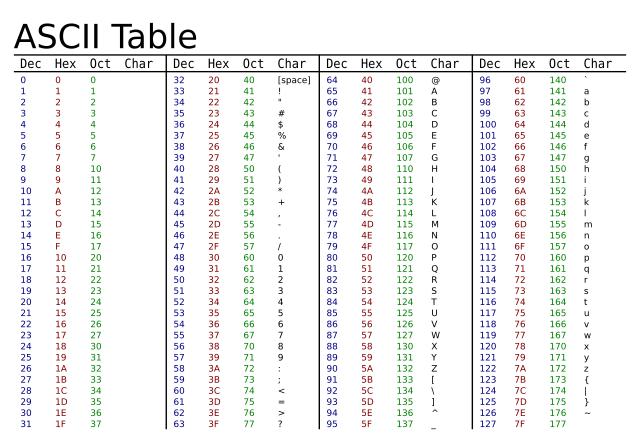
As mentioned before, there's no string type in C. Instead, we use char arrays, terminated by a null terminator. What that means is that we have to declare and initialize a char array, taking in consideration that we'll need an extra cell in the end that will contain the null terminator, '\0'. Some of you might think that '\0' is actually two characters, but in fact this is an ASCII value, denoted by the backslash, and in this case, the ASCII value of the null terminator.
For reference, here's the ASCII table:
There are two ways we can initialize a string:
char str[LEN + 1] = {'H', 'e', 'l', 'l', 'o', '\0'};
Where LEN is defined to be 5. Using this method is inefficient and hard to maintain and work with. Instead, use this:
char str[LEN + 1] = "Hello";
Which is clearer and more intuitive. Notice, here we used double quotes instead of single quotes.
Finally, let's try to modifiy our code so that instead of passing the string to printf directly, we pass the variable:
#include <stdio.h>
#define LEN 9
int main(){
char message[LEN] = "Success!";
printf(message);
return 0;
}
Formatting printf's argument
In the previous article, I mentioned printf stands for print formatted. Of course, sometimes we would want to print
more complicated strings, such that incorporate multiple variables and of different types. to do that, we have to use
printf's designated specifiers. Those specifiers, are denoted by a '%' with a following letter indicating the type of variable.
A few common ones:
- %d - an integer's specifier.
- %f - a double or a float's specifier.
- %c - a char's specifier.
- %s - a string's specifier.
For example:
#include <stdio.h>
int main(){
int num = 5;
printf("The number %d is a prime number.", num);
return 0;
}
Here, we're passing the string unformatted and the specifier %d within it, and an int as the 2nd parameter. The formatting process replaces the first specifier with the first argument after the unformatted the string. This stands for every i specifiers and i parameters, so long as the parameter matches the specifier, otherwise, some unexpected behavior will occur.
However, if you tried using %f instead of %d, you will see it's treated as a float instead. That is because of a feature in C called casting, and in this case, implicit casting. Since this article is already getting long, I'll leave this for the next article, which will be about arithmetic, casting, and keywords.
Summary
We've learned about variables, arrays, and strings, all of which can be used to store data. However, we're yet to go over how take data as an input, and store it in variables, that's what we'll be discussing in the next article. We'll also go over casting, and how Integer promotion works. And in-between, we'll mention some nifty keywords, and use all of the former to program a simple personalized calculator! Until then!